
Bad audio? Blurry video? Most new creators face the same problems and assume the fix is expensive. It's not. Here's the YouTube content creator equipment that actually helps you start making videos on a budget.

Tripod: Keep your YouTube videos steady and well-framed
A standard tripod provides a stable, fixed shot for clearer footage. However, when starting your YouTube channel by yourself, you often have to repeatedly stop to adjust the camera angle while moving, and then edit out those interruptions later. But we found the Moman TT07 auto-tracking tripod to fix that—at under $50.
Its face tracking is impressively responsive. Simply flash an OK sign to start and walk across the room to grab a prop. The mount rotates 360° to keep you in frame. For solo creators, it's like having a personal videographer.
It can securely hold a smartphone, small digital camera, or action camera using a phone clamp and a 1/4-inch screw mount. Setup is quick. Drop the base and the legs auto-open.
An included wireless remote lets you start and stop recording from up to 33 feet away. The height adjusts from 18 to 69 inches, ideal for handheld YouTube vlogging and standing shots.

🛒 Price: $49.99
✨ Key features:
- Automatic face tracking with 360° rotation
- Base automatically deploys when lifted 10cm
- Adjustable height from 18" to 69"; folds down to 18"
- Wireless remote range of 33 feet
LED light: Upgrade lighting for professional-looking YouTube videos
Even with the best camera, your video can look bad in poor lighting. Notice how high-quality YouTube channels use bright frontal lighting to keep the subject's face clear, with colorful ambient light in the background.
We recommend the COLBOR CL60R because it works as both a key light and an ambient background light. It's the best equipment for content creators to get better lighting in videos.
With 65W of output, it's bright enough to use as your main light. A CRI of 97+ keeps skin tones accurate, without the washed-out look cheaper LEDs can give.
The RGB light effect is the real highlight. You can match the light color of your background to your brand or mood. And the Bowens mount lets you attach a softbox later on.
It also has 13 built-in lighting effects, like fire and lightning, so you don't have to add them in post. An audio-sensitive system changes the light with your voice or music—great for reaction-style content.

🛒 Price: $199.00
✨ Key features:
- 65W output; full-color RGB COB light
- Adjustable color temperature (2700K–6500K); CRI 97+
- 13 built-in lighting effects
- Bowens mount compatible
Microphone: Deliver clear audio that keeps viewers listening
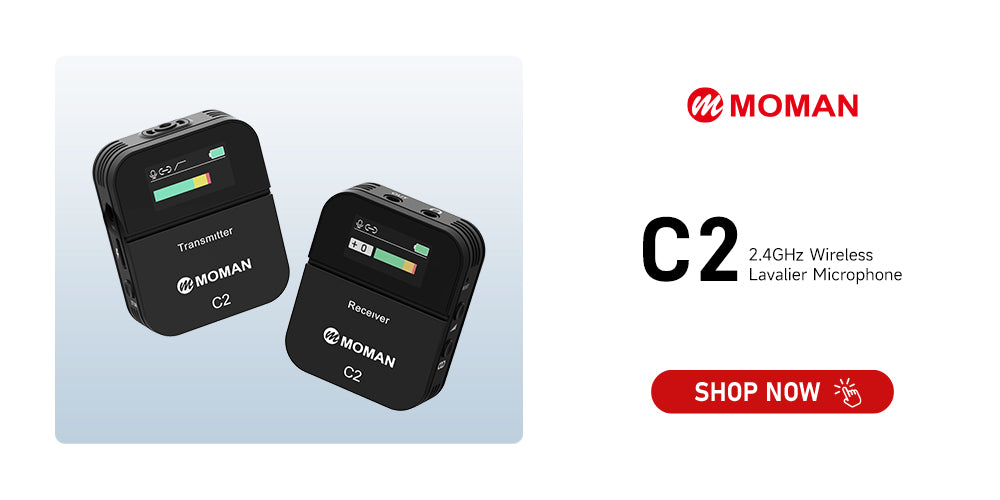
Poor audio drives viewers away faster than poor video, which is why YouTube content creator equipment should include a dedicated microphone.The Moman C2 is an excellent starting point for beginners—a wireless lavalier microphone around $120 that delivers clear, natural-sounding voice.
Clip the transmitter onto your collar, and it automatically pairs with the receiver within about a second of powering on. One-tap noise cancellation and 6-level gain control let you balance your voice and background noise—turn it up for quiet tutorials or down for interviews on noisy streets.
The TFT screen shows battery, signal, and audio levels at a glance. There's also a headphone jack for real-time monitoring, so you'll never record 20 minutes only to find the mic was muted.
Battery lasts up to 8 hours, with a stable 200m range—you can set down your camera and walk to the other side of the room without the audio cutting out.
🛒 Price: $119.00
✨ Key Features:
- 2.4GHz wireless with 200m transmission range
- 6-level gain control and one-tap noise reduction
- TFT display for real-time monitoring
- 3.5mm headphone jack
- 8-hour battery life
- Includes lavalier mic, windscreen, and cables
Teleprompter: Keep your script in sight to reduce retakes and save time
When recording scripted YouTube videos, mistakes cost you time. Forget a line or slip up, and you either start over or spend extra time editing it out. Beginners are often already nervous on camera, and stumbling over words only makes it worse. A teleprompter can save a huge amount of re-shooting time.
The Moman MT12 reflects text from your device onto a glass panel. It fits devices up to 12.9 inches, so you can put your tablet on it. Beginners can appear natural and confident without memorizing lines. Just read the script while looking toward the lens, and the audience sees you looking at them.
A Bluetooth remote lets you control scrolling speed—press a button to slow down or pause mid-speech. You can adjust font size, color, and scrolling speed in the smartphone app before shooting.
With a standard 1/4-inch screw mount, it attaches directly to a camera tripod. There's also an extra screw hole on top, so you can add a small fill light or microphone later.

🛒 Price: $149.00
✨ Key features:
- 12-inch tempered beam-splitter glass; 15-foot reading range
- Supports tablets up to 12.9 inches
- Bluetooth remote control (2–10 meter range)
- One-piece metal frame
- 1/4-inch tripod mount
- Top-mounted expansion screw hole
More YouTube content creator tools to improve your creation
Beyond the essentials, a few more tools round out a solo creator's setup:
- Computer: The backbone of recording, editing, and streaming. A powerful desktop or high-performance laptop with a strong CPU and GPU handles 4K editing well.
- Camera: Smartphones work, but DSLR/mirrorless cameras, 4K webcams, or action cams like GoPro offer better quality and flexibility.
- Capture card: Needed to record or stream from consoles, cameras, or another PC. External cards are plug-and-play; internal PCIe cards offer higher performance.
- Editing software: Beginners can start with DaVinci Resolve (powerful free version) or CapCut (simple, great for short videos). Professionals often choose Adobe Premiere Pro for its advanced features and industry-standard workflow.
- Headphones: Essential for real-time audio monitoring. Any wired earbuds work—you don't need expensive studio monitors. Plug them into your mic receiver or camera to catch wind noise, static, or muffled audio before you hit record.
- Storage: High-quality video takes up space, so use a larger internal drive or an external hard drive.


