
For any content creator, having the right gear is crucial to produce high-quality work and keep your audience engaged. Investing in the best equipment for content creators not only improves your content but also saves time and effort. Whether you’re vlogging on the go or preparing a professional shoot, knowing the right gear helps you create more polished and effective content.

Start with a smartphone: Essential content creator gear for beginners
The first tool you’ll need for creating videos is either a smartphone or a DSLR camera. If you’re just starting out and hesitant to invest a lot of money in an expensive camera, a smartphone is the perfect option to begin your journey.
Nowadays, most smartphones come equipped with cameras capable of shooting high-resolution videos. They offer features that were once exclusive to professional cameras, such as Optical Image Stabilization (OIS), 4K video recording, and advanced autofocus, allowing you to produce impressive content.
One of the biggest advantages of using a smartphone is its convenience. It’s compact, lightweight, and always on hand, so you don’t have to carry bulky cameras or multiple lenses.
As you gain more experience and start earning from your content, you can consider upgrading to a high-end camera. To help you get started, we’ve put together some recommendations.
🏆 Our recommendations for smartphones
iPhone 13 Pro: Known for excellent video quality, the iPhone 13 Pro offers superb stabilization and strong low-light performance. If your budget allows, consider upgrading to the iPhone 14 Pro Max.
Samsung Galaxy S23 Ultra: This phone impresses with 8K video, 10x zoom, 480fps slow motion, and stable, crisp footage. Its large battery supports long shoots, and the S-Pen doubles as a remote for recording.
Google Pixel 7 Pro: A budget-friendly option, the Pixel 7 Pro shoots 4K@60fps on both cameras and smooth slow-motion at 120/240fps. Its cinematic blur adds a professional touch for its price.
Gimbals and tripods for content creators: The best equipment for smooth footage
A professional-looking video relies on steady footage, as shaky shots can reduce engagement. To achieve this, you can use either a gimbal or a tripod, depending on the situation.
Gimbals use motors and sensors to stabilize your camera in real time, making them perfect for action shots, sports, dance routines, or any dynamic scenes where smooth movement is key.
Tripods provide stability for static shots, such as podcasts, product reviews, or setups where your camera remains in one position.
📌 When to use
- Gimbal: Ideal for capturing motion and fast-paced activities.
- Tripod: Best for stationary videos that require consistent framing.
🏆 Our Recommendations
Moman CL07 — For solo smartphone content creators: The Moman CL07 is designed for solo smartphone creators who need flexibility without carrying multiple accessories. It works as both a selfie stick and a tripod, and features a detachable wireless monitor, allowing you to preview framing even when shooting from a distance. This makes it useful for social content where you frequently switch between handheld shots and fixed angles.
Moman Max80 — tripod for stable, studio-style shots: If your content relies on locked-off, stable framing, the Moman Max80 tripod is built for that purpose. With a maximum working height of around 200 cm and a 360° ball head, it supports precise camera positioning for eye-level or overhead shots. The sturdy construction helps reduce micro-shakes during long recordings, making it ideal for product reviews, talking-head videos, interviews, and podcasts. When needed, it can also convert into a monopod, giving creators more flexibility in limited spaces.
Microphone for content creators: Clear audio made simple
When creating content, what your audience hears matters just as much—if not more—than what they see. High-quality audio depends on the right equipment. Choosing proper microphones and basic accessories is essential for clear, professional sound.
Choose a proper mic based on the type of your content creation:
- Lavalier microphones: Ideal for interviews and presentations; discreet and reliable for video recording
- Shotgun microphones: Great for podcasts and voiceovers; directional pickup reduces background noise
- Look for high sensitivity and low self-noise for cleaner audio
And you may need accessories to improve audio quality:
- Pop filters reduce plosive sounds
- Stands or mounts improve mic stability and placement
- Minimize background noise; basic soundproofing or acoustic treatment enhances clarity
🏆 Our recommendations for content creator microphones
Moman M1 — For solo mobile content creators: Designed for single-person smartphone recording, the Moman M1 features a compact wireless clip-on mic with plug-and-play operation, making it ideal for vlogs, short videos, and talking-head content where quick setup and clean voice capture matter.
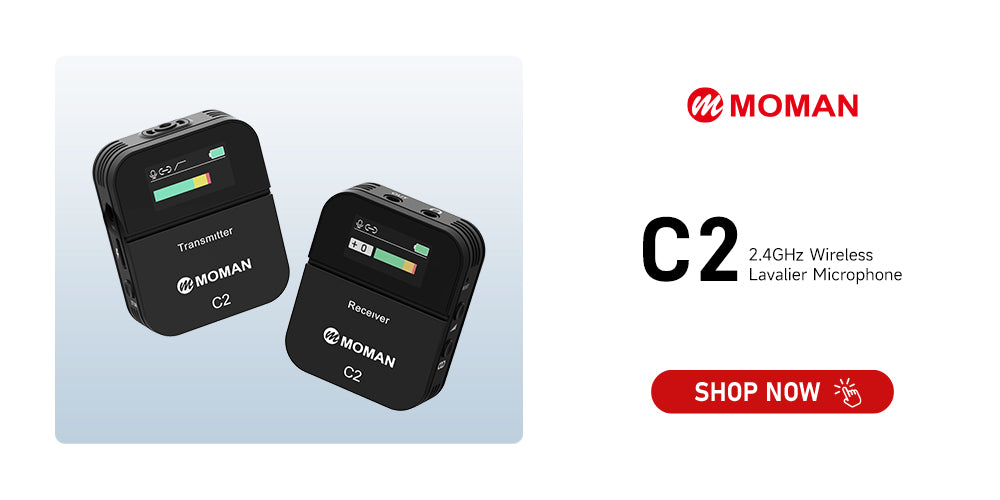
Moman C2 or C2X — For one- or two-person camera recording: The Moman C2X supports dual transmitters to one receiver, making it well-suited for two-person camera-based interviews or dialogue videos, while its stable wireless transmission helps keep both voices clear and balanced on set.
Lighting: Illuminate your content professionally
Using artificial lighting allows you to create visually engaging content while also controlling the mood and brightness of your setup. Two commonly used lighting solutions that can elevate your videos are ring lights and softbox lights.
Ring lights are recognized for their circular shape, which provides consistent, shadow-free illumination on your face. They are frequently used for recording beauty tutorials, makeup demonstrations, and glamorous shots.
Softbox lighting, with its soft and diffused light, is ideal for situations where you want even lighting that minimizes harsh shadows. This type of lighting is often preferred for product photography or cinematic-style setups.
LED panel lights are versatile, portable, and adjustable, providing consistent lighting for both video and photography. They’re great for streaming, interviews, or any situation where you need a customizable light source.
🏆 Our recommendations
Moman PC8: A compact, portable RGB LED light perfect for solo creators and on-the-go shooting. It offers adjustable brightness and full 0-360° color control, a wide 2500K-9000K range, and built-in color effects that help you light YouTube videos, portraits, or product shots with accurate color and creative flair.
COLBOR W100: A pocket-sized 100W LED video light ideal for creators needing a powerful yet portable light for interviews, talking-head videos, and content collabs. With high-CRI bi-color, app control, and multiple power options, it delivers professional illumination anywhere you shoot.
Teleprompter: Script assistance for content creators
A teleprompter is one of the best equipment for content creators who want to deliver smooth, confident, and professional-looking videos. It allows you to read your script while maintaining direct eye contact with the camera, which helps your content appear natural and engaging. Teleprompters are especially useful for tutorials, product reviews, online courses, or any video where precise wording is important.
Modern teleprompters are often compact and compatible with smartphones, tablets, or DSLR cameras, making them easy to set up and carry. Some models even come with remote controls or apps that let you adjust the scrolling speed, font size, and script order, giving you full control over your delivery. By incorporating a teleprompter into your setup, you can save time on multiple takes and enhance the overall professionalism of your content.
🏆 Our recommendations
Moman MT12: This is a reliable teleprompter that helps content creators deliver smooth, confident on-camera lines while keeping natural eye contact. Its 12-inch glass provides clear text visibility, and it supports display devices like phones and tablets of up to 12.9 inches. With app or remote control for text playback, the MT12 makes scripted videos—like tutorials, reviews, and online courses—more efficient and professional.
Editing tools: Powerful software for polished videos
After you’ve assembled your gear and completed your recording, the real transformation begins in post-production. This stage is where your raw clips are shaped into a polished final video. The process includes trimming footage, correcting colors, enhancing audio, adding graphics, and inserting captions.
At times, you may also deal with media files that aren’t in the most editing-friendly formats. For instance, iPhones often save images as HEIC, which some editing programs don’t support. To prevent compatibility issues, you can simply convert HEIC files to JPG.
It’s also important to note that a strong computer is essential for smooth video editing. Working with high-resolution footage and visual effects requires substantial processing power and plenty of storage. Without a capable system, your editing workflow can slow down and become frustrating.
🏆 Our recommendations
Adobe Premiere Pro: A leading professional editor that integrates with Photoshop and After Effects through the Adobe Creative Suite. It requires a paid plan—$21/month—and has a steep learning curve.
DaVinci Resolve: One of the fastest pro editing tools for both Mac and Windows, widely used even in Hollywood. It offers a powerful free version, with an optional upgrade for advanced features.
Content creator equipment checklist: Gear for every project
Every creator has different limits when it comes to budget, time, and space. A practical content-creator kit should respect those constraints while still leaving room for future upgrades. Rather than copying someone else’s impressive gear wall, it’s more effective to match equipment setups to typical creator profiles.
Table: Example setups for common creator types
| Creator Type | Main Focus | Typical Gear Mix |
|---|---|---|
| Phone-Only Starter | Short social videos | Smartphone, wired lavalier mic, small tripod, compact light, power bank |
| Growing Video Maker | Weekly uploads | Mirrorless camera, wireless microphones, two-light setup, faster computer, portable power station |
| Mobile Professional | Client projects and travel work | Dual-camera setup, multiple lenses, advanced audio kit, laptop, several power banks, high-capacity portable power station |
These setups are meant to be flexible. The point is to recognize how each upgrade supports a particular type of work, instead of purchasing gear simply for the sake of owning more equipment. As you progress, your creator kit should evolve into a well-designed system that fits your needs, not just a random collection of tools.


