
If you've ever filmed a dish that looked incredible in person yet fell flat on camera, you already know—capturing that beauty takes more than just a good recipe. The right gear bridges the gap between what you see and what your viewers see.
This guide covers the food content creator equipment that actually makes a difference. Whether you're just starting or ready to invest in a professional setup, we'll walk you through what you need, so you can create mouth-watering food content.

Getting started: Food content creator equipment for beginners
You don’t need an expensive studio to start creating food content. A smartphone, good lighting, and a few simple accessories can already help you produce attractive videos. Start with the basics, then upgrade your setup as your content grows.
👉 Smartphone
A smartphone is the easiest way to start food content creation. Modern phones offer excellent camera quality, image stabilization, and smart processing features that can capture detailed food shots without professional equipment.
Many successful creators begin with nothing more than a phone. Instead of waiting for a perfect setup, focus on improving your shooting techniques and creating consistently.
🏆 Recommended options:
📱 iPhone 16 Pro: A powerful smartphone for food creators, offering excellent video quality, advanced stabilization, and accurate color reproduction for detailed food shots.
📱 Samsung Galaxy S25 Ultra: Ideal for creators who need versatile camera options, with multiple lenses, high-resolution recording, and strong low-light performance.
📱 Google Pixel 9 Pro: A smart choice for beginners, featuring advanced computational photography, easy shooting modes, and natural-looking image processing.
👉 Phone tripod
A stable tripod helps prevent shaky footage, maintain consistent framing, and free up your hands while cooking or arranging food.
Phone tripods are lightweight, portable, and easy to adjust, making them ideal for creators who film in different locations or need a simple setup.
🏆 Best phone tripod for food content creators: Moman WS22

The Moman WS22 phone tripod is ideal for food content beginners. You can quickly get started as the legs deploy automatically with a single press. The MagSafe mount securely attaches and detaches your phone in seconds, requiring no clips or fiddling.
The height ranges from 13 to 66 inches, so it can be placed on a desk for close-up food photography that highlights details, or on the floor for cooking tutorials. It's also lightweight enough to hold by hand for overhead shots—perfect for capturing flat-lay plating or showing the ingredients needed for a recipe.
Its 360-degree rotating head lets you switch between portrait and landscape modes instantly, adapting your content for platforms like Instagram Reels, TikTok, or YouTube without interrupting your workflow.
👉 Natural light and reflector
Lighting plays a major role in making food look appetizing. Good lighting highlights textures, colors, and details, while poor lighting can make dishes appear flat.
Start with natural lighting. A large window, preferably facing north or south, can provide soft and consistent illumination throughout the day. Place your dishes close to the window to take advantage of the natural light.
To reduce harsh shadows and create a more balanced look, use a white foam board or reflector on the opposite side of the food to bounce light back. This simple setup is affordable, easy to create, and works surprisingly well for beginner food creators.
Leveling up: Best equipment for food content creators
Once you want more control over image quality, lighting, and audio, upgrading your food content creator equipment can take your food videos to a more professional level.
👉 Camera: Captures higher-quality food visuals
A dedicated camera provides better image quality, color accuracy, and creative control compared with smartphones.
Mirrorless cameras and DSLRs are popular choices because they perform well in different lighting conditions and support interchangeable lenses.
For food creators, cameras with good autofocus and strong low-light performance are especially useful for recipe videos, close-up shots, and cooking demonstrations.
🏆 Recommended options:
📷 Sony ZV-E10: Designed for content creators who need flexible shooting options, with strong autofocus, interchangeable lenses, and excellent video quality.
📷 Canon EOS R50: A beginner-friendly mirrorless camera with great image quality, easy controls, and reliable performance for food videos.
📷 Panasonic Lumix G100: A compact creator-focused camera with good stabilization, clear audio features, and a portable design.
👉 Lens: Shows food details and creates cinematic shots
The right lens can dramatically change how your food content looks.
Macro lenses are excellent for capturing details like textures, ingredients, and close-up shots, while wide-angle lenses work better for overhead layouts and larger scenes.
A lens with a wide aperture can also create a soft background blur, helping the food stand out.
👉 Camera tripod: Provides stable professional shooting
A camera tripod supports heavier equipment and keeps footage steady during recording.
For food content, adjustable angles are especially important because creators often switch between overhead views, close-ups, and side angles. For eye-level or 45-degree angle shots, a standard tripod is perfectly adequate.
However, for overhead shots—such as flat lays or full-view displays—you will need a tripod equipped with a horizontal arm or a dedicated overhead mounting rig.
🏆 Best tripod for food content creators: Moman Max80

This sturdy camera tripod is ideal for filming a recipe tutorial in your kitchen or in a dedicated studio space.
It handles most DSLR and mirrorless setups. Height adjusts from 17.5 to 79 inches. It can be placed on a countertop for close-up food shots or extended fully on the floor.
The center axis inversion feature lets you shoot from low-angle perspectives, for capturing steam rising from a hot bowl or the rich texture of freshly baked bread.
👉 Microphone: Improves voice and cooking sounds
Clear sound helps viewers follow recipes, understand explanations, and enjoy cooking sounds.
🎙️ Wireless lavalier mic: Records a clear voice while moving
A wireless lavalier microphone clips onto clothing and keeps your voice clear while you cook, explain recipes, or demonstrate techniques. It is ideal for hands-free recording and creator-style food videos.
🏆 Recommended food content microphone: Moman C2
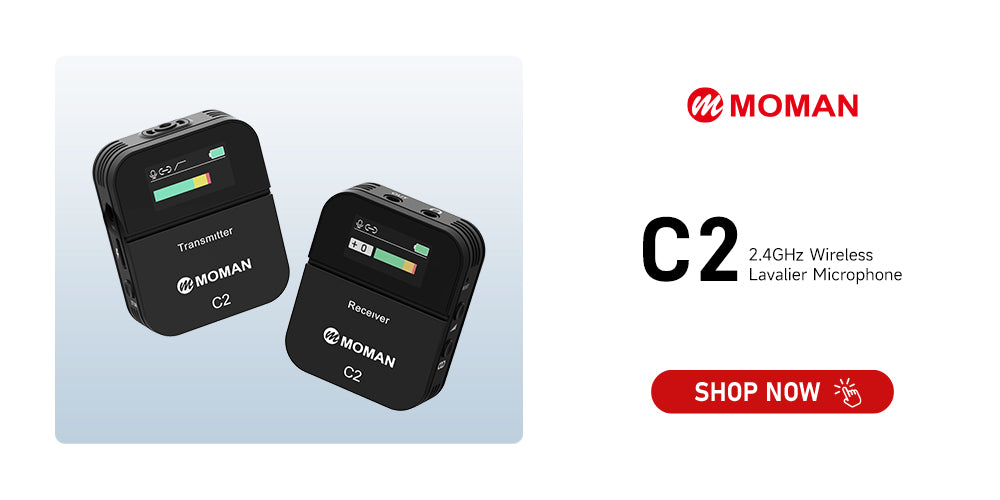
Moman C2 is a wireless lavalier microphone for those who appear on camera for cooking tutorials or go out exploring food spots.
It's compatible with both phones and cameras. The TFT display shows battery life and audio levels at a glance. The battery is enough for a full day of hopping between restaurants.
The one-button noise cancellation cuts through background hum, such as exhaust fans. The 6-level gain control and audio monitoring help you get a more satisfying audio.
🎙️ Shotgun microphone: Captures natural cooking sounds
Shotgun microphones are often mounted on top of the camera or on a boom arm. It can focus on sound from the front while reducing surrounding noise. They are useful for capturing food ASMR moments, such as chopping ingredients and frying sounds.
👉 Lighting: Makes food look more delicious
A portable LED light gives creators more control over brightness and color temperature, helping maintain consistent video quality.
🏆 Recommended light for food content creation: COLBOR W100

This is a 100W compact LED light that gives you studio-quality illumination. It's portable enough to move around your kitchen and bright enough to act as your main light.
With CRI 97+, colors stay true—greens look vibrant, cheese stays golden, and meats keep their rich sear. Color temperature adjusts from 2700K to 6500K with an APP, so you can dial in warm, cozy tones for baking content or cooler, crisp light for refreshing salads and drinks.
Power it via DC adapter, USB-C, or battery grip—giving you the freedom to shoot anywhere without hunting for an outlet.
Whether you're filming at noon or midnight, the W100 delivers consistent, natural-looking light that makes your food look as good as it tastes.
👉 Editing tool: Polishes your food content
Editing transforms simple recordings into polished videos. The right editing software helps remove mistakes, adjust colors, add music, and improve the overall storytelling.
🏆 Recommended options:
🎞️ CapCut: Best for beginners and mobile creators. Easy to use with templates and quick editing tools.
🎞️ DaVinci Resolve: Ideal for creators who need professional color grading and advanced editing features.
🎞️ Adobe Premiere Pro: A powerful professional editing platform with extensive tools and integrations.
🎞️ Final Cut Pro: A fast and optimized option for Mac users.
👉 Other accessories: Improve workflows and video quality
These accessories are not always required, but they can improve your workflow and video quality with other food content creation tools.
◾ Monitor: Helps check focus, framing, and exposure, especially for overhead food shots.
◾ Teleprompter: Allows creators to read scripts while looking at the camera, reducing retakes during presentations.
◾ Backdrop: Creates a cleaner background and gives videos a more professional appearance.
◾ SD card: A high-speed V30 or higher card ensures smooth 4K recording without interruptions. Keep extra storage available for longer shoots.


