
What equipment is needed for a podcast? The answer depends on whether you’re recording audio-only or video, your budget, and how professional you want your setup to be. From a simple USB microphone and headphones to full video podcast rigs with cameras and lighting, this guide breaks down the essential podcast equipment you actually need. We also offer clear examples at different budget levels to help you get started without overspending.

What basic equipment do you need for a podcast? Must-haves for audio-only podcasts
To create a high-quality audio-only podcast, you don’t need a lot of fancy gear, but the right equipment is crucial. From microphones to editing software, here's a quick guide to the must-have tools for professional sound.
Computer
How can podcasts function without a powerful computer at the core? A computer is essential for any podcasting setup, as it's used for recording, editing, and publishing digital audio files. While almost any computer can work, a laptop is especially suited for beginners due to its portability and smaller footprint compared to a desktop. Select a laptop that’s capable of running the recording and editing software required for producing your podcast.
Microphones
Microphones are the most crucial podcast audio equipment. An external microphone delivers better sound quality than the built-in mic on your computer. When choosing the best podcasting equipment, it's worth considering both USB microphones and wireless microphones.
USB mics: This is a popular and simple piece of podcasting gear. These are typically condenser mics (in contrast to dynamic microphones) that connect directly to your computer using a USB cable. USB mics are perfect for beginners, particularly for those doing solo or monologue-style podcasts, as well as for people hosting online interview shows. Most of these microphones feature a Cardioid polar pattern, meaning they are optimized to capture the voice of one speaker at a time.
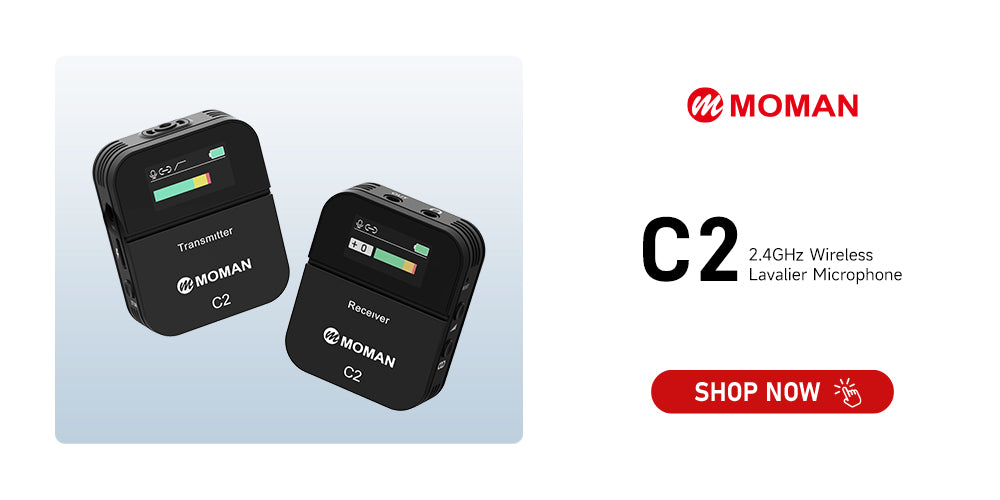
Wireless lav mic: Not all podcasters record in front of a computer or at a mic stand in a studio. Some creators need more flexibility in their setup. For instance, someone recording a yoga series may be performing dynamic poses throughout the session. Similarly, some podcasters record on the go, wherever they can, and require equipment that’s quick, portable, and adaptable. This is where wireless lav mics come into play.
Pop filters and windscreens
A pop filter is a mesh or foam screen placed in front of the mic, while a windscreen covers the mic itself. These accessories can be the key to transforming a basic recording into a professional, high-quality podcast, free from distracting noises that take attention away from the content.
Pop filters and windscreens are essential tools for eliminating plosive sounds, like the burst of air from the "p" in "power," which can cause clipping and strain the mic.
Microphone stands
A mic stand or boom arm helps position your podcasting microphones for optimal comfort, allowing you, your co-hosts, and guests to sit comfortably during recording. Proper mic placement can also enhance sound quality. Additionally, a mic stand saves valuable desk space, which is crucial in smaller recording areas.
Headphones
Each host will need a quality pair of noise-canceling headphones to monitor sound quality and mic levels during recording. These headphones provide live audio feedback, helping to prevent errors and reduce the need for retakes. Opt for closed-back headphones for podcasting, as open-back models can leak sound that may be picked up by the microphones.
When selecting headphones, keep these specifications in mind:
- Frequency Response
- Sound Isolation
- Impedance
- Sensitivity
- Comfort
- Portability
- Price
Recording software
Your primary recording software is typically a DAW (Digital Audio Workstation), which allows you to record and edit your podcast in one place. Here are some popular options:
- Audacity: Free and open-source, offering basic recording and editing tools for both Windows and Mac.
- GarageBand: Pre-installed on Apple devices, ideal for beginners looking for an easy-to-use interface.
- Adobe Audition: A more advanced choice with multitrack tools and strong noise reduction capabilities for in-depth editing.
- Hindenburg PRO: A spoken-word-focused editor with automatic leveling and publishing tools, widely used in podcast production.
Inside your DAW, you can cut out mistakes, rearrange sections, add subtle sound effects, and improve audio quality before exporting your final product.
What equipment do you need for a video podcast? Key gear to invest in
Your video podcasting setup is similar to an audio-only podcast, with a few extra pieces of equipment. Here’s what you’ll need:
Camera
The camera is the most essential tool for a video podcast. A good camera ensures your video looks sharp and professional. While smartphones now feature decent cameras, a dedicated DSLR or mirrorless camera offers more flexibility, including control over settings, lens options, and overall video quality.
Lighting
While a lighting kit isn’t always essential — natural light or a simple ring light can work fine for podcasting — it becomes crucial in dim settings. Good lighting has a significant impact on video quality. It ensures your subject looks clear and professional. Softboxes or LED panels offer even, diffused lighting, creating a flattering look for most people on camera.
Tripod
Stability is essential for a smooth video podcast recording. A tripod keeps your camera steady, preventing shaky footage that can be distracting or look unprofessional. Depending on your setup, you might also want tripods or stands for your lighting and microphone. Since you won’t be moving the camera around frequently, a simple, reliable option like the Moman Max80 is a great choice.
Teleprompter
A teleprompter (or autocue) is a device that displays text for a speaker in a way that doesn’t distract the audience. It eliminates the need for cue cards and is especially helpful for video podcasting or YouTube shows.
With a teleprompter, you won’t have to look down to read, which keeps you focused on the camera and engaged with the audience. Since the screen is placed in front of the speaker, often near or attached to the camera, it makes the speaker appear as though they’ve memorized their lines, creating a more polished and professional presentation.
What equipment is needed for a podcast? Examples by budget
Here are practical podcast equipment examples at different budget levels, so you can quickly see what you actually need and how much to spend.
Starter kit: Under $250
Perfect for a first-time solo podcaster:
- A USB microphone with a basic desktop stand
- Closed-back wired headphones
- A light boom arm and pop filter
- Free DAWs like Audacity or GarageBand
- Some cushions or blankets to help absorb sound in the room
Serious hobbyist kit: Around $500 to $1,000
For creators committed to long-term podcasting:
- A dynamic XLR microphone with a high-quality shock mount and pop filter
- A two-channel interface with at least two mic inputs
- Closed-back wired headphones with strong sound isolation
- Entry-level acoustic panels to treat your recording space
- A DAW with your preferred editing tools
Studio-level kit: $1,300+ or rent a studio
For brands, agencies, or networks:
- Multiple XLR microphones on premium boom arms
- A multi-channel interface or mixer
- A digital recorder as a backup
- A professionally treated room with acoustic panels and soundproofing
- One or more cameras and lights for a video podcast


