
Many beginners spend weeks researching podcast equipment for beginners, reading reviews, and comparing products before recording a single episode. In fact, the key is choosing reliable equipment that allows you to start creating immediately and fits your budget.
In this guide, we list the essential podcast equipment for beginners, discover what gear is truly necessary, and find practical tips for building a simple recording setup that delivers professional-sounding results.

Podcast equipment list for beginners
Creating a great podcast doesn't require a room full of expensive hardware. Here is a list for a basic setup for both audio-only podcasts and video podcasts.
📌 For audio-only podcasts, you need:
- Audio recording device
- Microphone
- Pop filter and windshields
- Headphones
- Recording and editing software
📌 For video podcasts, you also need:
- Camera
- Tripod
- Teleprompter
- Light
Podcast recording equipment for beginners: audio-only
Audio is the foundation of any podcast. Building a capable audio recording setup is more affordable than many people expect.
👉 Audio recording device: Capture and store your podcast audio
You can absolutely record a podcast using a smartphone. However, if you're working from a dedicated recording space, a desktop computer or laptop typically offers greater flexibility and easier workflow management.
If you're planning to record video alongside your audio, having 16GB of RAM or more can improve performance, but it isn't strictly necessary when you're just getting started.
👉 Headphones: Monitor audio quality in real time
Headphones allow you to hear exactly what the microphone captures in real time, making it easier to identify background noise, clipping, distortion, or microphone placement issues before they ruin an entire recording session.
Closed-back headphones are particularly popular for podcasting because they prevent sound leakage from being picked up by the microphone.
Also consider purchasing microphones with monitoring interfaces at the same time.
👉 Microphone: Record clear and pro voice audio
Your microphone is arguably the most important piece of podcast equipment. Clear, natural voice recording helps establish credibility and keeps listeners focused on your content rather than audio distractions.
🎙️ USB microphones
USB microphones are often the starting point for podcast beginners, with affordable prices.
They connect directly to a computer without requiring additional audio interfaces or complicated setup procedures. Simply plug in the microphone, select it in your recording software, and begin recording.
🎙️ Wireless lavalier microphones (mostly for video podcasts)
Lavalier microphones are commonly associated with video content, but they are not strictly limited to video podcasts.
They provide greater freedom of movement while maintaining consistent audio quality. If you prefer standing presentations or mobile recording setups, wireless lavalier microphones are better than USB microphones.
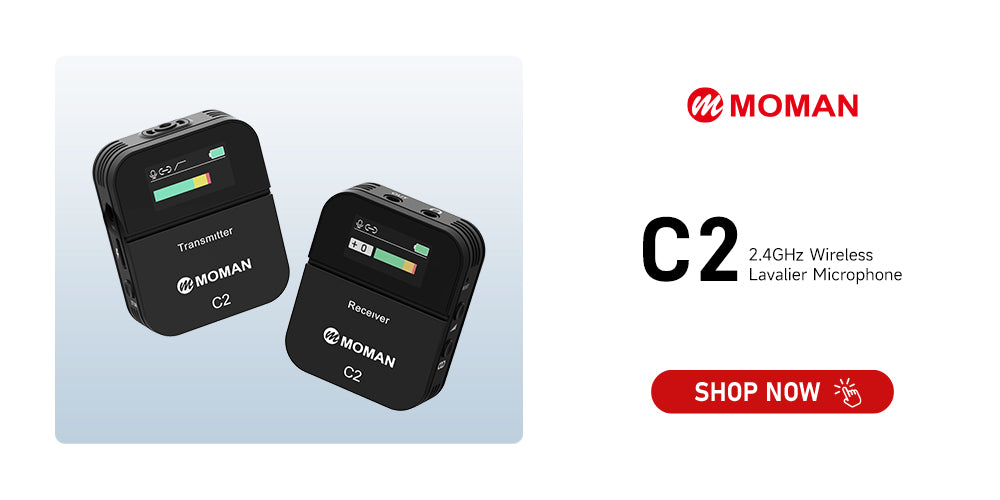
🏆 Recommended best podcast microphone for beginners: Moman C2
The Moman C2 provides a flexible and reliable solution for both studio and mobile podcast production.
We love the TFT display and a 3.5mm real-time monitoring port. They let you easily monitor audio, battery status, and signal strength during podcast recording.
The setup is simple. Featuring 6-level gain control and one-button noise cancellation, it’s easy for beginners to use.
A professional furry windshield and cotton wind muff are included to reduce plosives.
The C2 is ideal for solo podcasts, while the C2X includes dual transmitters for two-person podcast setups.
👉 Pop filter or windshields: Reduce plosives and unwanted noise
Pop filters and windshields help improve recording quality by reducing harsh bursts of air created when pronouncing consonants such as "P" and "B."
A pop filter is typically positioned between your mouth and the microphone, while a windshield fits directly over the microphone capsule.
Windshields are often included in a microphone kit.
Nylon pop filters remain the most affordable option, while metal mesh designs generally offer greater durability and slightly improved transparency.
When purchasing one, make sure it fits your microphone size and provides adequate coverage.
👉 Recording and editing software: Record, edit, and publish your podcast
Even the best microphone can't compensate for poor recording software. Choosing the right platform allows you to record, edit, and export your episodes efficiently.
Most podcasters use a Digital Audio Workstation (DAW), which combines recording and editing tools in a single application. You can remove mistakes, adjust volume levels, reduce background noise, and add music.
Popular options include:
🎞️ Audacity: Free, open-source software available on Windows and Mac.
🎞️ GarageBand: Included with Apple devices and beginner-friendly.
🎞️ Adobe Audition: Advanced editing tools with powerful noise reduction features.
🎞️ Hindenburg PRO: Designed specifically for spoken-word production and podcast workflows.
Video podcast equipment for beginners
Video podcasts continue to grow in popularity across YouTube, Spotify, and social media platforms. While audio quality remains critical, adding video requires additional equipment to create a professional viewing experience.
👉 Camera: Capture high-quality video for your podcast
A quality camera helps present you and your guests in the best possible way.
Many beginners start with a webcam, which works perfectly well for remote interviews and simple recordings.
And smartphones have become one of the most practical video podcast cameras available today, offering impressive image quality without requiring a separate investment.
If you have a sufficient budget and want to achieve higher-quality video podcasts, you might consider equipping yourself with professional cameras, such as DSLR cameras.
👉 Tripod: Keep your camera stable and properly framed
A tripod provides stability and helps eliminate shaky footage. Whether you're using a smartphone, webcam, mirrorless camera, or DSLR, a tripod ensures consistent framing throughout your recording.
Available options range from basic phone tripods to professional video tripods with fluid heads for smooth camera movement. Choose one that supports your recording device and fits your shooting environment.
👉 Teleprompter: Deliver scripts naturally while maintaining eye contact
By displaying your script directly in front of the camera lens, a teleprompter helps maintain natural eye contact with viewers. It also improves confidence and minimizes retakes, making recording sessions more efficient. For scripted podcasts, it is definitely the best podcast equipment for beginners.
🏆 Recommended podcast teleprompter for beginners: Moman MT12
The Moman MT12 helps reduce the repetitive recording or editing work caused by mistakes in speech, ideal for video podcast recording!
It can be installed with various cameras—even DSLRs equipped with telephoto lenses, allowing you to keep natural eye contact with your camera.
The 12-inch screen is large and highly clear, allowing easy text reading even from a distance of 15 feet. The quality of the beam-splitter glass is also exceptional.
An iPad Pro can be placed on the text device holder. It can also match your speaking pace with app control for scrolling speed, text size, and timing.

👉 Lights: Improve video quality and create a professional look
Lighting has a dramatic impact on video podcast quality. Even an expensive camera can produce disappointing footage if the lighting is poor.
For beginners, a single LED light paired with a diffuser is often enough to create a clean and flattering image. As your setup evolves, you may want to explore a traditional three-point lighting arrangement consisting of a key light, fill light, and backlight for more professional results.
🏆 Recommended podcast light for beginners: COLBOR W100
The COLBOR W100 is powerful yet compact as a key light for video podcast recording.
It delivers up to great brightness at 0.5m, enough to serve as a main light source, with app-based control for brightness and color temperature.
Don't worry whether this light distracts your audio capture. Its quiet cooling system ensures noise levels of only 28 dB.
It supports multiple charging options, so you can use different power sources to supply electricity to it.

How to set up podcast equipment for beginners?
Purchasing equipment is only the first step. Proper setup and recording techniques are equally important for achieving professional results.
🎬 Use proper microphone positioning
Place your microphone approximately 4 to 6 inches away from your mouth. Instead of speaking directly into the microphone, angle your voice slightly to the side. This technique helps reduce plosive sounds and prevents distortion.
🎬 Record in a quiet environment
Choose a room with soft furnishings such as carpets, curtains, sofas, or bedding. These materials absorb reflections and reduce echo.
Avoid empty rooms, kitchens, or spaces with large hard surfaces, as these environments tend to create excessive reverberation.
🎬 Monitor your recordings
Always wear headphones while recording. Monitoring allows you to immediately identify issues such as clipping, background noise, interference, or microphone movement before they affect the final episode.
🎬 Record locally whenever possible
If you're conducting remote interviews, local recording solutions can significantly improve quality.
Instead of relying solely on internet connections, local recording captures audio directly on each participant's device and uploads the files afterward, resulting in higher-quality recordings and fewer technical problems.
🎬 Polish your audio
Even well-recorded audio benefits from post-production processing.
Basic adjustments such as noise reduction, volume leveling, equalization, and compression can dramatically improve clarity and create a more polished listening experience. Many modern editing tools now include AI-powered enhancements that simplify this process.
Common podcast equipment mistakes beginners should avoid
For many new podcasters, avoiding common mistakes sometimes has a greater impact than purchasing premium equipment.
1. Buying expensive gear too early
It's tempting to invest heavily before publishing your first episode, but most beginners don't yet know which features they truly need.
Start with affordable and basic podcast equipment for beginners, learn the production process, and upgrade strategically as your experience grows.
2. Ignoring room acoustics
A great microphone cannot completely overcome a poor recording environment.
Echo and room reflections often have a larger impact on sound quality than the microphone itself. Improving your recording space should be a priority.
3. Using the wrong microphone type
Different microphones serve different purposes.
A USB microphone may be ideal for desk-based recording, while a wireless lavalier microphone is better suited for mobile presentations or video content.
Choose equipment that matches your recording style.
4. Recording without monitoring audio
Many beginners discover problems only after finishing an entire session. Wearing headphones during recording helps catch issues immediately and can save hours of re-recording.
5. Making the setup unnecessarily complicated
Adding too many devices, accessories, and software tools can create technical headaches and slow down production. Keep your workflow simple at the beginning and focus on producing consistent content.


